
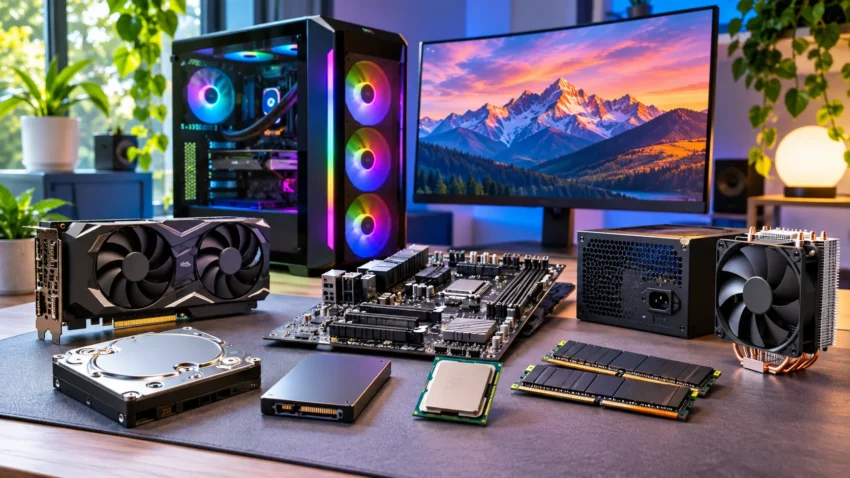
Computer hardware lifespan refers to how long a computer’s physical components can work reliably before they need repair, replacement, or upgrading. Most computers last between 3 and 8 years, depending on hardware quality, usage, maintenance, and operating conditions. However, some components can continue working for more than a decade when properly maintained.
Understanding the expected lifespan of computer hardware helps users make better purchasing decisions. It also helps businesses plan upgrades, control maintenance costs, and avoid unexpected system failures. Knowing when to replace aging components can improve performance and protect important data.
This guide explains how long different computer components typically last, what affects their durability, and how to extend their useful life. It also covers common warning signs and practical maintenance tips to keep your computer running efficiently.
What Is Computer Hardware Lifespan?
Computer hardware lifespan is the period during which physical computer components remain functional and useful. It includes essential parts such as processors, memory, storage drives, motherboards, and power supplies. Each component has a different expected service life based on its design, manufacturing quality, and operating conditions.
Hardware lifespan can be divided into physical lifespan and useful lifespan. Physical lifespan refers to how long a component continues working without failure. Useful lifespan describes how long that component can meet current performance, compatibility, and security requirements.
For example, a computer processor may continue functioning for more than ten years. However, its performance might become insufficient for modern software much earlier. Therefore, hardware replacement decisions should consider both physical durability and practical usability.
Average Lifespan of Computer Hardware Components
Different computer components have different replacement cycles because they perform different functions. Some parts experience mechanical wear, while others are affected by heat and electrical stress. Understanding these differences makes hardware maintenance and upgrade planning easier.
The following table provides approximate lifespan estimates for common computer hardware components. These figures represent typical usage expectations rather than guaranteed failure dates. Actual results can vary significantly depending on workload, manufacturing quality, and maintenance practices.
| Computer Hardware | Expected Lifespan |
|---|---|
| CPU (Processor) | 7–10+ years |
| GPU (Graphics Card) | 4–8 years |
| RAM (Memory) | 8–12+ years |
| HDD (Hard Disk Drive) | 3–6 years |
| SSD (Solid-State Drive) | 5–10 years |
| Motherboard | 5–10 years |
| Power Supply Unit | 5–10 years |
| Cooling Fans | 3–7 years |
| Laptop Battery | 2–5 years |
| Computer Monitor | 5–10+ years |
These estimates should serve as general guidelines rather than strict replacement deadlines. A well-maintained component may work longer, while a poorly maintained one can fail unexpectedly. Regular monitoring and preventive maintenance are more useful than replacing hardware solely because it reaches a certain age.
How Long Does a Computer Processor Last?
The central processing unit, or CPU, is one of the most durable computer components. Modern processors contain no moving mechanical parts, which reduces physical wear during normal operation. A quality CPU can often function for 7 to 10 years or longer under suitable operating conditions.
Processor lifespan depends heavily on temperature, voltage, and workload. Excessive heat can accelerate component degradation, especially when cooling systems are inadequate. Aggressive overclocking and elevated operating voltages may also reduce long-term reliability.
Although processors can remain physically functional for many years, software requirements change over time. Older CPUs may struggle with modern applications, multitasking, or newer operating systems. Upgrading becomes worthwhile when performance limitations affect productivity or compatibility, even when the processor still works.
How Long Does RAM Last?
Random access memory, commonly called RAM, temporarily stores information that active programs need. Because RAM contains no moving mechanical components, it generally experiences relatively little physical wear during ordinary computer use. Quality memory modules can remain functional for 8 to 12 years or longer.
RAM failures may occur because of manufacturing defects, excessive temperatures, electrical problems, or unstable memory settings. Symptoms can include unexpected crashes, application errors, and system instability. However, these problems may also originate from other hardware or software issues.
RAM replacement is often driven by performance requirements rather than physical failure. Modern applications and operating systems frequently need more memory than older systems provide. Increasing RAM capacity can improve multitasking and responsiveness without replacing the entire computer.
How Long Do Hard Disk Drives Last?
Hard disk drives use rotating magnetic platters and mechanical read/write heads to store data. These moving components experience wear as the drive operates, making HDDs more vulnerable to mechanical failure than solid-state storage. Many consumer hard drives remain useful for approximately 3 to 6 years.
Several factors influence hard drive lifespan, including operating temperature, vibration, workload, and manufacturing quality. Continuous heavy activity and unsuitable environmental conditions may increase failure risk. However, some hard drives continue operating reliably for considerably longer than average estimates.
Common warning signs include unusual noises, slow file access, repeated read errors, and disappearing files. These symptoms should never be ignored because drive failure can result in permanent data loss. Maintaining current backups is essential, regardless of the drive’s age or reported health.
How Long Do Solid-State Drives Last?
Solid-state drives store information using flash memory rather than spinning mechanical disks. This design makes SSDs resistant to many mechanical problems associated with traditional hard drives. Under normal consumer workloads, quality SSDs can remain useful for approximately 5 to 10 years.
SSD durability depends partly on the number of writes supported by its flash memory. Manufacturers commonly express endurance using total bytes written, also called TBW. Higher-endurance models can generally tolerate greater cumulative writing activity before reaching their rated endurance limits.
However, reaching an SSD’s endurance rating does not automatically mean the drive will immediately fail. Controllers, firmware, electrical issues, and other factors can also influence reliability. Monitoring drive health, keeping backups, and maintaining adequate free space can support dependable long-term operation.
How Long Does a Graphics Card Last?
Graphics processing units handle visual rendering, gaming, video editing, and various computational workloads. A graphics card can typically remain functional for 4 to 8 years, although some models last considerably longer. Its useful lifespan often depends on how demanding the user’s applications become.
High temperatures, heavy workloads, and inadequate cooling can affect graphics card reliability. Dust accumulation may restrict airflow, while aging fans can reduce cooling performance. Extended operation under excessive heat may accelerate degradation of surrounding electronic components.
Graphics cards are frequently upgraded because of changing performance requirements rather than complete hardware failure. Newer games and professional applications may demand additional processing power or graphics memory. Users should compare their actual performance needs before investing in a replacement GPU.
How Long Does a Motherboard Last?
The motherboard connects major computer components and allows them to communicate with one another. It contains circuits, connectors, voltage regulation components, and expansion slots that support essential system operations. A motherboard may last approximately 5 to 10 years when used under suitable conditions.
Motherboard reliability can be affected by electrical surges, excessive temperatures, moisture, and component quality. Poor airflow may expose voltage regulation components to unnecessary thermal stress. Physical damage during installation or maintenance can also cause connectivity problems.
Motherboards often become outdated because newer processors and memory technologies require different sockets or standards. An older motherboard may remain functional but limit future hardware upgrades. Replacing it can sometimes be necessary to improve compatibility, expand connectivity, or support newer technology.
How Long Does a Power Supply Last?
The power supply unit converts incoming electrical power into the voltages required by computer components. A quality PSU commonly lasts between 5 and 10 years, depending on its construction, workload, and cooling conditions. Some premium models may remain reliable beyond this estimated period.
Power supply components can gradually deteriorate because of heat, electrical stress, and aging. Low-quality units may experience reliability problems sooner, particularly when operating near their rated capacity. Stable electrical input and sufficient ventilation can improve operating conditions.
Signs of potential power supply problems include random shutdowns, startup failures, and unexpected restarts. However, these symptoms can also have other causes and require proper diagnosis. Because power supplies contain hazardous electrical components, internal repairs should be handled only by qualified professionals.
How Long Do Computer Cooling Systems Last?
Computer cooling systems regulate temperatures to protect processors, graphics cards, and other sensitive components. Air cooling systems typically combine metal heatsinks with electric fans. While the heatsink can remain usable for many years, cooling fans often need replacement after approximately 3 to 7 years.
Fan lifespan depends on bearing quality, operating speed, dust exposure, and environmental conditions. Over time, worn bearings may produce unusual noise or reduce fan performance. Dust buildup can also restrict airflow and force cooling systems to work harder.
Liquid cooling systems introduce additional components, including pumps, tubing, and radiators. All-in-one liquid coolers may have a practical service life of roughly 4 to 7 years, although actual durability varies. Monitoring temperatures and replacing failing cooling components helps prevent overheating and performance problems.
How Long Do Laptop Batteries Last?
Laptop batteries naturally lose storage capacity as they age and complete charging cycles. Most modern laptops use lithium-ion or related battery technologies that experience gradual chemical degradation. A typical laptop battery may remain practically useful for approximately 2 to 5 years.
Battery lifespan depends on charging habits, temperature, usage patterns, and the number of completed charge cycles. Excessive heat can accelerate battery aging and reduce available capacity. Frequently operating a laptop in very hot environments may shorten its usable battery life.
Common signs of battery aging include reduced runtime, unexpected shutdowns, and declining battery health readings. Some laptops provide built-in tools for reviewing battery capacity and charging history. A swollen battery requires prompt professional attention and should not continue being charged or used.
Factors That Affect Computer Hardware Lifespan
Operating temperature is one of the most important factors influencing computer hardware reliability. Excessive heat can accelerate the aging of electronic components and reduce system stability. Proper airflow, functional cooling systems, and suitable room temperatures help reduce unnecessary thermal stress.
Hardware quality and workload also influence long-term durability. Components manufactured with reliable materials and effective thermal designs may perform better under demanding conditions. Systems used for continuous rendering, heavy computation, or intensive gaming can experience different stress patterns than computers used for basic office tasks.
Environmental conditions and maintenance habits matter as well. Dust, moisture, electrical fluctuations, and physical impacts can damage sensitive hardware. Keeping equipment clean, ensuring adequate ventilation, and using appropriate electrical protection can help reduce preventable failures over time.
Signs Your Computer Hardware Is Wearing Out
Unexpected shutdowns, repeated crashes, and unexplained performance changes can indicate potential hardware problems. However, these symptoms can also result from operating system errors, software conflicts, or malware. Accurate troubleshooting is necessary before concluding that a physical component has failed.
Unusual sounds may provide additional warning signs. Grinding noises from mechanical drives, rattling cooling fans, or persistent vibration can indicate developing mechanical problems. Rising temperatures and frequent overheating warnings may suggest cooling issues that require maintenance or replacement.
Hardware monitoring tools can help identify potential problems before complete failure occurs. Storage health utilities, temperature monitors, and memory diagnostic programs provide useful information about component condition. Backing up essential files before troubleshooting is especially important when storage failure is suspected.
How to Extend Computer Hardware Lifespan
Regular cleaning is one of the simplest ways to support computer hardware longevity. Dust buildup can restrict airflow, increase temperatures, and reduce cooling efficiency. Clean accessible vents and exterior surfaces carefully, and follow manufacturer instructions before opening the computer or using compressed air.
Good cooling and proper placement also help maintain stable operating conditions. Keep computers away from direct heat sources and avoid blocking ventilation openings. Laptops should generally be used on firm, flat surfaces that allow their cooling systems to function effectively.
Software maintenance contributes to hardware reliability and long-term usability. Keep operating systems, firmware, drivers, and security software updated through trusted sources. Regular backups, careful power management, and monitoring of system temperatures can also help protect data and identify developing problems.
When Should You Replace Computer Hardware?
Hardware replacement becomes necessary when a component fails, becomes unreliable, or no longer meets performance requirements. Frequent crashes, persistent overheating, and repeated storage errors may justify further diagnosis. However, replacing components without identifying the underlying problem can waste money.
Performance upgrades are worthwhile when existing hardware limits everyday tasks. Additional RAM may improve multitasking, while replacing a mechanical hard drive with an SSD can significantly improve responsiveness. A newer graphics card may benefit users whose applications require greater rendering or computing power.
Compatibility and security should also influence replacement decisions. Older systems may no longer support current operating systems, security updates, or essential software. When several major components require upgrading simultaneously, purchasing a newer computer may provide better long-term value.
Is It Better to Repair or Replace an Old Computer?
Repairing an older computer can be cost-effective when the problem involves a single replaceable component. Installing new storage, increasing memory, or replacing a faulty fan may restore reliable operation. These improvements can extend the useful life of an otherwise capable system.
Replacement becomes more attractive when repair costs approach the price of a suitable newer computer. Multiple component failures, limited upgrade options, and outdated operating system support can reduce the value of continued repairs. Energy efficiency and warranty coverage may also influence the decision.
The best approach is to compare repair costs with expected future usability. Consider whether the computer will support necessary applications for the next several years. A practical cost-benefit assessment helps avoid unnecessary spending while maintaining reliable performance and security.
Computer Hardware Lifespan for Gaming and Office Computers
Gaming computers often operate under heavier graphics and processing workloads than standard office systems. Modern games can demand substantial GPU performance, system memory, and cooling capacity. Consequently, gaming hardware may become outdated for new titles even while its physical components remain functional.
Office computers generally handle tasks such as email, web browsing, spreadsheets, and document editing. These activities often place lower demands on graphics hardware and processing resources. A well-maintained office computer may remain productive for several years without requiring major upgrades.
Workload should guide hardware replacement rather than age alone. Gamers may prioritize graphics card upgrades, while office users may benefit more from additional memory or faster storage. Choosing upgrades according to actual needs can extend system usability and control long-term computing costs.
Conclusion
Computer hardware lifespan varies according to component type, manufacturing quality, workload, and maintenance. While processors and memory can remain functional for many years, storage devices, fans, and batteries may require replacement sooner. Understanding these differences helps users plan maintenance and upgrades more effectively.
Regular cleaning, adequate cooling, stable electrical conditions, and software maintenance can support hardware reliability. Monitoring performance and responding to warning signs may prevent minor issues from developing into more serious problems. Maintaining current data backups remains essential because unexpected hardware failures can occur at any age.
The most effective replacement strategy considers both physical condition and practical usefulness. A component does not necessarily need replacement simply because it has reached its estimated lifespan. By making informed upgrade decisions, users can improve performance, manage expenses, and get greater value from their computers.
Frequently Asked Questions
How many years does computer hardware typically last?
Most computer hardware remains useful for approximately 3 to 10 years, depending on the component. Processors and RAM may last longer, while batteries, fans, and mechanical storage drives often require earlier replacement.
Can a computer last 10 years?
Yes, a computer can physically last 10 years or longer with proper maintenance. However, older hardware may struggle with modern applications, operating system requirements, and security updates, making replacement more practical.
Which computer component has the longest lifespan?
Processors and RAM are among the longest-lasting computer components because they contain no moving mechanical parts. Quality CPUs and memory modules can often operate for more than a decade under suitable conditions.
Does gaming reduce computer hardware lifespan?
Gaming does not automatically cause premature hardware failure. However, demanding games increase processing workloads and heat generation, which can accelerate component aging when cooling or operating conditions are inadequate.
How often should computer hardware be replaced?
Computer hardware should generally be replaced when it fails, becomes unreliable, lacks necessary software support, or cannot meet performance requirements. Regular inspections and maintenance are more effective than following a fixed replacement schedule.